1. numpy & pandas 模块简介
1.1 为什么使用这些模块
- 运算速度快:
numpy和pandas都是采用 C 语言编写,pandas又是基于numpy,是numpy的升级版本 - 消耗资源少:采用的是矩阵运算,会比
python自带的字典或者列表快好多
1.2 安装
pip install numpy
pip install pandas
1.3 答疑
np.array与np.ndarray什么关系np.array()是一个函数,返回值是ndarray对象np.ndarray是类,其对象是numpy库的核心内容
- 哪些地方可以看到参考
2. NumPy 模块
2.1 array 数组
import numpy as np

array = np.array([[1, 2, 3],
                  [2, 3, 4]])
print(array)
print('dim:', array.ndim)
print('shape:', array.shape)
print('size:', array.size)
输出
[[1 2 3]
 [2 3 4]]
dim: 2
shape: (2, 3)
size: 6
2.2 array 的属性
数据类型
array = np.array([1, 23, 4], dtype=np.int)
print(array.dtype) # int32
dtype 也可以是 int32、int64、float64、float32、float16、float 等。
定义一个矩阵
定义一个 的矩阵
array = np.array([[1, 2, 3],
                  [2, 3, 4]])
生成零矩阵
array = np.zeros((3, 4))[[0. 0. 0. 0.]
[0. 0. 0. 0.]
[0. 0. 0. 0.]]同样地,一矩阵可以这样
array = np.ones((3, 4), dtype=np.int16)[[1 1 1 1]
[1 1 1 1]
[1 1 1 1]]空矩阵产生的数字非常接近于 0
array = np.empty((3, 4))arange 定义范围
array = np.arange(10, 20, 2)[10 12 14 16 18]数组是可以调整大小
array = np.arange(12).reshape((3, 4))[[ 0 1 2 3]
[ 4 5 6 7]
[ 8 9 10 11]]生成线段
array = np.linspace(1, 10, 20)[ 1. 1.47368421 1.94736842 2.42105263 2.89473684 3.36842105
3.84210526 4.31578947 4.78947368 5.26315789 5.73684211 6.21052632
6.68421053 7.15789474 7.63157895 8.10526316 8.57894737 9.05263158
9.52631579 10. ]2.3 基础运算 1
加法、减法
a = np.array([10, 20, 30, 40])
b = np.arange(4)
c = a - b
print(c)
[10 19 28 37]此外还支持 + - * / ** 等运算
如果需要数学函数,使用 np.sin()、np.cos() 等
判断列表的每个元素
a = np.array([10, 20, 30, 40])
b = np.arange(4)
c = b + a
print(c > 20)
[False True True True]矩阵的逐乘
a = np.array([[10, 20],
[30, 40]])
b = np.arange(4).reshape((2, 2))

print(a)
print(b)
print(a * b)
[[10 20]
[30 40]]
[[0 1]
[2 3]]
[[ 0 20]
[ 60 120]]矩阵乘法
a = np.array([[10, 20],
[30, 40]])
b = np.arange(4).reshape((2, 2))

print(np.dot(a, b))
[[ 40 70]
[ 80 150]]也可以这样
print(a.dot(b))求矩阵最值和元素和
a = np.random.random((2, 4))
print(a)
print(np.max(a))
print(np.min(a))
print(np.sum(a))
[[0.79462592 0.92274083 0.33200946 0.52841366]
[0.9566772 0.92666163 0.45966559 0.90595931]]
0.9566771979364372
0.3320094610107348
5.826753600962572使用 axis 对列或行进行操作
a = np.random.random((2, 4))
print(a)
print(np.max(a, axis=1))
print(np.max(a, axis=0))
[[0.20042346 0.77388751 0.09078707 0.8851757 ]
[0.73427516 0.96644108 0.48863157 0.06373091]]
[0.8851757 0.96644108]
[0.73427516 0.96644108 0.48863157 0.8851757 ]时在行中找给定值,而 是在列中找。
2.4 基础运算 2
找最值索引
a = np.arange(2, 14).reshape((3, 4))
print(np.argmax(a), np.argmin(a))
11 0平均值
print(np.mean(a))
# 或者
print(a.mean())
# 或者
print(np.average(a))7.5cumsum 计算累加
a = np.arange(2, 14).reshape((3, 4))
print(np.cumsum(a))
[ 2 5 9 14 20 27 35 44 54 65 77 90]累差
累差返回这个数字和下一个数据的差值
a = np.arange(2, 14).reshape((3, 4))
print(np.diff(a))
[[1 1 1]
[1 1 1]
[1 1 1]]生成非零位置
a = np.arange(2, 14).reshape((3, 4))
print(np.nonzero(a))
(array([0, 0, 0, 0, 1, 1, 1, 1, 2, 2, 2, 2], dtype=int64), array([0, 1, 2, 3, 0, 1, 2, 3, 0, 1, 2, 3], dtype=int64))排序
a = np.arange(14, 2, -1).reshape((3, 4))
print(np.sort(a))
[[11 12 13 14]
[ 7 8 9 10]
[ 3 4 5 6]]矩阵的转置
a = np.arange(14, 2, -1).reshape((3, 4))
print(np.transpose(a))
# 或者
print(a.T)
[[14 10 6]
[13 9 5]
[12 8 4]
[11 7 3]]如,计算 的方法
print((a.T).dot(a))裁剪
a = np.arange(14, 2, -1).reshape((3, 4))
print(np.clip(a, 5, 9))
[[9 9 9 9]
[9 9 8 7]
[6 5 5 5]]【说明】 基本上所有的
np.mean()等方法都支持axis参数,可以指定对行或列求指定数据
2.5 索引
一维数组索引
a = np.arange(3, 15)
print(a[3])6二维数组索引
a = np.arange(3, 15).reshape((3, 4))
print(a[1][1])
# 或者
print(a[1, 1])8如果需要获取某一行可以直接使用索引,或者使用 :
a = np.arange(3, 15).reshape((3, 4))
print(a[1, :])
print(a[:, 1])
print(a[1, 1:3])
[ 7 8 9 10]
[ 4 8 12]
[8 9]迭代
a = np.arange(3, 15).reshape((3, 4))
for x in a:
    print(x)
[3 4 5 6]
[ 7 8 9 10]
[11 12 13 14]如果需要迭代列的话,可以使用转置
a = np.arange(3, 15).reshape((3, 4))
for x in a.T:
    print(x)
[ 3 7 11]
[ 4 8 12]
[ 5 9 13]
[ 6 10 14]逐个元素迭代
for x in a.flat:
    print(x)
3
4
5
6
7
8
9
10
11
12
13
14flat 平整化
print(a.flat)       # 是迭代器
print(a.flatten())  # 是数组
<numpy.flatiter object at 0x0000025F12DD4750>
[ 3 4 5 6 7 8 9 10 11 12 13 14]2.6 数组合并
垂直合并
a = np.array([1, 1, 1])
b = np.array([2, 2, 2])

print(np.vstack((a, b)))
[[1 1 1]
[2 2 2]]横向合并
a = np.array([1, 1, 1])
b = np.array([2, 2, 2])

print(np.hstack((a, b)))
[1 1 1 2 2 2]单行转置
# 单行的数组是不能转置的
a = np.array([1, 1, 1])
b = np.array([2, 2, 2])

print(a.T)
# 使用下面的方法转置
print(a[:, np.newaxis])
# 也可以使用
# print(a.reshape((3, 1)))
[1 1 1]
[[1]
[1]
[1]]多个合并操作
a = np.array([1, 1, 1])
b = np.array([2, 2, 2])

print(np.concatenate((a, b, b, a), axis=0))
[1 1 1 2 2 2 2 2 2 1 1 1]使用 concatenate() 可以指定 axis
a = np.array([1, 1, 1]).reshape((3, 1))
b = np.array([2, 2, 2]).reshape((3, 1))

print(np.concatenate((a, b, b, a), axis=1))
[[1 2 2 1]
[1 2 2 1]
[1 2 2 1]]2.7 数组分割
等量分割
a = np.arange(12).reshape((3, 4))
print(a)
print(np.split(a, 2, axis=1))
[[ 0 1 2 3]
[ 4 5 6 7]
[ 8 9 10 11]]
[array([[0, 1],
[4, 5],
[8, 9]]), array([[ 2, 3],
[ 6, 7],
[10, 11]])]不等量分割
np.vsplit() 和 np.hsplit() 是等量分割的函数
a = np.arange(12).reshape((3, 4))

print(np.array_split(a, 3, axis=1))
print(np.vsplit(a, 3))
print(np.hsplit(a, 2))
[array([[0, 1],
[4, 5],
[8, 9]]), array([[ 2],
[ 6],
[10]]), array([[ 3],
[ 7],
[11]])]
[array([[0, 1, 2, 3]]), array([[4, 5, 6, 7]]), array([[ 8, 9, 10, 11]])]
[array([[0, 1],
[4, 5],
[8, 9]]), array([[ 2, 3],
[ 6, 7],
[10, 11]])]2.8 数组复制
浅复制
a = np.arange(4)
b = a
深复制
a = np.arange(4)
b = a.copy()
print(b == a, b is a)
[ True True True True] False3. pandas 模块
3.1 基本介绍
序列
import pandas as pd
import numpy as np

s = pd.Series([1, 3, 6, np.nan, 44, 1])
print(s)
0 1.0
1 3.0
2 6.0
3 NaN
4 44.0
5 1.0
dtype: float64时间序列
dates = pd.date_range('20210920', periods=6)
print(dates)
DatetimeIndex(['2021-09-20', '2021-09-21', '2021-09-22', '2021-09-23',
'2021-09-24', '2021-09-25'],
dtype='datetime64[ns]', freq='D')pd.DataFrame
index 是行标签,columns 是列标签
dates = pd.date_range('20210920', periods=6)
df = pd.DataFrame(np.random.randn(6, 4),
                  index=dates, columns=['a', 'b', 'c', 'd'])
print(df)
a b c d
2021-09-20 -0.106398 2.215358 -0.501202 -0.094997
2021-09-21 -0.558050 0.745729 -0.601212 1.759786
2021-09-22 0.051629 -1.629926 1.406677 -1.327422
2021-09-23 -0.252966 -1.170558 0.629834 -0.510257
2021-09-24 0.149876 -1.281186 -1.681875 -1.250431
2021-09-25 1.245540 -0.942136 0.321260 -0.702087默认地,pandas 也会加上行、列的标签
df = pd.DataFrame(np.arange(12).reshape((3, 4)))
print(df)
0 1 2 3
0 0 1 2 3
1 4 5 6 7
2 8 9 10 11DataFrame 是一张数表
df = pd.DataFrame({
    'A': 1.0,
    'B': pd.Timestamp('20210920'),
    'C': pd.Series(1, index=list(range(4)), dtype='float32'),
    'D': np.array([3] * 4, dtype='int32'),
    'E': pd.Categorical(['test', 'train', 'test', 'train']),
    'F': 'Foo'
})
A B C D E F
0 1.0 2021-09-20 1.0 3 test Foo
1 1.0 2021-09-20 1.0 3 train Foo
2 1.0 2021-09-20 1.0 3 test Foo
3 1.0 2021-09-20 1.0 3 train Foo联系上面的例子,dtypes,index,columns 属性值
print(df.dtypes)
print(df.index)
print(df.columns)
A float64
B datetime64[ns]
C float32
D int32
E category
F object
dtype: object
Int64Index([0, 1, 2, 3], dtype='int64')
Index(['A', 'B', 'C', 'D', 'E', 'F'], dtype='object')其他一些属性和方法 values、describe()
print(df.values)
print(df.describe())
[[1.0 Timestamp('2021-09-20 00:00:00') 1.0 3 'test' 'Foo']
[1.0 Timestamp('2021-09-20 00:00:00') 1.0 3 'train' 'Foo']
[1.0 Timestamp('2021-09-20 00:00:00') 1.0 3 'test' 'Foo']
[1.0 Timestamp('2021-09-20 00:00:00') 1.0 3 'train' 'Foo']]
A C D
count 4.0 4.0 4.0
mean 1.0 1.0 3.0
std 0.0 0.0 0.0
min 1.0 1.0 3.0
25% 1.0 1.0 3.0
50% 1.0 1.0 3.0
75% 1.0 1.0 3.0
max 1.0 1.0 3.0转置
print(df.T) 0 1 2 3
A 1.0 1.0 1.0 1.0
B 2021-09-20 00:00:00 2021-09-20 00:00:00 2021-09-20 00:00:00 2021-09-20 00:00:00
C 1.0 1.0 1.0 1.0
D 3 3 3 3
E test train test train
F Foo Foo Foo Foo排序
print(df.sort_index(axis=1, ascending=False)) F E D C B A
0 Foo test 3 1.0 2021-09-20 1.0
1 Foo train 3 1.0 2021-09-20 1.0
2 Foo test 3 1.0 2021-09-20 1.0
3 Foo train 3 1.0 2021-09-20 1.0排序
print(df.sort_index(axis=0, ascending=False)) A B C D E F
3 1.0 2021-09-20 1.0 3 train Foo
2 1.0 2021-09-20 1.0 3 test Foo
1 1.0 2021-09-20 1.0 3 train Foo
0 1.0 2021-09-20 1.0 3 test Foo排序
print(df.sort_values(by='E')) A B C D E F
0 1.0 2021-09-20 1.0 3 test Foo
2 1.0 2021-09-20 1.0 3 test Foo
1 1.0 2021-09-20 1.0 3 train Foo
3 1.0 2021-09-20 1.0 3 train Foo3.2 数据选择
选择
dates = pd.date_range('20210920', periods=6)
df = pd.DataFrame(np.arange(24).reshape((6, 4)),
                  index=dates, columns=['A', 'B', 'C', 'D'])
print(df)
A B C D
2021-09-20 0 1 2 3
2021-09-21 4 5 6 7
2021-09-22 8 9 10 11
2021-09-23 12 13 14 15
2021-09-24 16 17 18 19
2021-09-25 20 21 22 23使用 df['A'] 或者 df.A 来选择数据
print(df['A'], df.A, sep='\n')2021-09-20 0
2021-09-21 4
2021-09-22 8
2021-09-23 12
2021-09-24 16
2021-09-25 20
Freq: D, Name: A, dtype: int32
2021-09-20 0
2021-09-21 4
2021-09-22 8
2021-09-23 12
2021-09-24 16
2021-09-25 20
Freq: D, Name: A, dtype: int32使用 loc 选择数据
print(df.loc['20210920'])A 0
B 1
C 2
D 3
Name: 2021-09-20 00:00:00, dtype: int32另外一个例子
print(df.loc['20210921':, ['A', 'B']]) A B
2021-09-21 4 5
2021-09-22 8 9
2021-09-23 12 13
2021-09-24 16 17
2021-09-25 20 21按位置切片
print(df.iloc[3:5, 1:3]) B C
2021-09-23 13 14
2021-09-24 17 18条件筛选
print(df[df['A'] > 8]) A B C D
2021-09-23 12 13 14 15
2021-09-24 16 17 18 19
2021-09-25 20 21 22 233.3 设置值
按位置设置
df.iloc[2, 2] = 111
print(df)
A B C D
2021-09-20 0 1 2 3
2021-09-21 4 5 6 7
2021-09-22 8 9 111 11
2021-09-23 12 13 14 15
2021-09-24 16 17 18 19
2021-09-25 20 21 22 23按标签设置
df.A[df.A > 5] = 0
print(df)
A B C D
2021-09-20 0 1 2 3
2021-09-21 4 5 6 7
2021-09-22 0 9 10 11
2021-09-23 0 13 14 15
2021-09-24 0 17 18 19
2021-09-25 0 21 22 23加入新的列
df['F'] = pd.Series([1, 2, 3, 4, 5, 6],
                    index=pd.date_range('20210920', periods=6))
print(df)
A B C D F
2021-09-20 0 1 2 3 1
2021-09-21 4 5 6 7 2
2021-09-22 8 9 10 11 3
2021-09-23 12 13 14 15 4
2021-09-24 16 17 18 19 5
2021-09-25 20 21 22 23 63.4 处理丢失数据
存在丢失的数据
dates = pd.date_range('20210920', periods=6)
df = pd.DataFrame(np.arange(24).reshape((6, 4)),
                  index=dates, columns=['A', 'B', 'C', 'D'])
df.iloc[0, 1] = np.nan
df.iloc[1, 2] = np.nan
print(df)
A B C D
2021-09-20 0 NaN 2.0 3
2021-09-21 4 5.0 NaN 7
2021-09-22 8 9.0 10.0 11
2021-09-23 12 13.0 14.0 15
2021-09-24 16 17.0 18.0 19
2021-09-25 20 21.0 22.0 23丢弃无效数据
print(df.dropna()) A B C D
2021-09-22 8 9.0 10.0 11
2021-09-23 12 13.0 14.0 15
2021-09-24 16 17.0 18.0 19
2021-09-25 20 21.0 22.0 23丢掉列
print(df.dropna(axis=1)) A D
2021-09-20 0 3
2021-09-21 4 7
2021-09-22 8 11
2021-09-23 12 15
2021-09-24 16 19
2021-09-25 20 23丢弃方式
how='all' 时只有所有的内容都无效才会被丢弃,默认 how='any'
print(df.dropna(axis=1, how='all')) A B C D
2021-09-20 0 NaN 2.0 3
2021-09-21 4 5.0 NaN 7
2021-09-22 8 9.0 10.0 11
2021-09-23 12 13.0 14.0 15
2021-09-24 16 17.0 18.0 19
2021-09-25 20 21.0 22.0 23填充数据
print(df.fillna(value=0)) A B C D
2021-09-20 0 0.0 2.0 3
2021-09-21 4 5.0 0.0 7
2021-09-22 8 9.0 10.0 11
2021-09-23 12 13.0 14.0 15
2021-09-24 16 17.0 18.0 19
2021-09-25 20 21.0 22.0 23是否存在数据丢失
print(np.any(df.isna()) == True)True3.5 pandas 导入导出
读取 .csv 文件
data = pd.read_csv('filename.csv')存储为 .pkl 文件
data.to_pickle('data.pkl')3.6 合并
数据
df1 = pd.DataFrame(np.ones((3, 4)) * 0,
                   columns=['a', 'b', 'c', 'd'])
df2 = pd.DataFrame(np.ones((3, 4)) * 1,
                   columns=['a', 'b', 'c', 'd'])
df3 = pd.DataFrame(np.ones((3, 4)) * 2,
                   columns=['a', 'b', 'c', 'd'])

print(df1, df2, df3, sep='\n')
a b c d
0 0.0 0.0 0.0 0.0
1 0.0 0.0 0.0 0.0
2 0.0 0.0 0.0 0.0
a b c d
0 1.0 1.0 1.0 1.0
1 1.0 1.0 1.0 1.0
2 1.0 1.0 1.0 1.0
a b c d
0 2.0 2.0 2.0 2.0
1 2.0 2.0 2.0 2.0
2 2.0 2.0 2.0 2.0垂直合并
res = pd.concat([df1, df2, df3], axis=0)
print(res)
a b c d
0 0.0 0.0 0.0 0.0
1 0.0 0.0 0.0 0.0
2 0.0 0.0 0.0 0.0
0 1.0 1.0 1.0 1.0
1 1.0 1.0 1.0 1.0
2 1.0 1.0 1.0 1.0
0 2.0 2.0 2.0 2.0
1 2.0 2.0 2.0 2.0
2 2.0 2.0 2.0 2.0index 重排
res = pd.concat([df1, df2, df3], axis=0, ignore_index=True)
print(res)
a b c d
0 0.0 0.0 0.0 0.0
1 0.0 0.0 0.0 0.0
2 0.0 0.0 0.0 0.0
3 1.0 1.0 1.0 1.0
4 1.0 1.0 1.0 1.0
5 1.0 1.0 1.0 1.0
6 2.0 2.0 2.0 2.0
7 2.0 2.0 2.0 2.0
8 2.0 2.0 2.0 2.0直接合并
df1 = pd.DataFrame(np.ones((3, 4)) * 0,
                   columns=['a', 'b', 'c', 'd'],
                   index=[1, 2, 3])
df2 = pd.DataFrame(np.ones((3, 4)) * 1,
                   columns=['b', 'c', 'd', 'e'],
                   index=[2, 3, 4])

print(df1, df2, sep='\n')
print(pd.concat([df1, df2], axis=0, ignore_index=True))
a b c d
1 0.0 0.0 0.0 0.0
2 0.0 0.0 0.0 0.0
3 0.0 0.0 0.0 0.0
b c d e
2 1.0 1.0 1.0 1.0
3 1.0 1.0 1.0 1.0
4 1.0 1.0 1.0 1.0
a b c d e
0 0.0 0.0 0.0 0.0 NaN
1 0.0 0.0 0.0 0.0 NaN
2 0.0 0.0 0.0 0.0 NaN
3 NaN 1.0 1.0 1.0 1.0
4 NaN 1.0 1.0 1.0 1.0
5 NaN 1.0 1.0 1.0 1.0join 方式
join 默认等于 outer,如果改为 inner 则裁剪
print(pd.concat([df1, df2], axis=0, join='inner')) b c d
1 0.0 0.0 0.0
2 0.0 0.0 0.0
3 0.0 0.0 0.0
2 1.0 1.0 1.0
3 1.0 1.0 1.0
4 1.0 1.0 1.0重新合并下标
print(pd.concat([df1, df2], axis=1).reindex(df1.index)) a b c d b c d e
1 0.0 0.0 0.0 0.0 NaN NaN NaN NaN
2 0.0 0.0 0.0 0.0 1.0 1.0 1.0 1.0
3 0.0 0.0 0.0 0.0 1.0 1.0 1.0 1.0序列 append
df1 = pd.DataFrame(np.ones((3, 4)) * 0,
                   columns=['a', 'b', 'c', 'd'],
                   index=[1, 2, 3])
df2 = pd.DataFrame(np.ones((3, 4)) * 1,
                   columns=['b', 'c', 'd', 'e'],
                   index=[2, 3, 4])
print(df1.append(df2, ignore_index=True))
a b c d e
0 0.0 0.0 0.0 0.0 NaN
1 0.0 0.0 0.0 0.0 NaN
2 0.0 0.0 0.0 0.0 NaN
3 NaN 1.0 1.0 1.0 1.0
4 NaN 1.0 1.0 1.0 1.0
5 NaN 1.0 1.0 1.0 1.0添加一条序列
df1 = pd.DataFrame(np.ones((3, 4)) * 0,
                   columns=['a', 'b', 'c', 'd'],
                   index=[1, 2, 3])
s1 = pd.Series([1, 2, 3, 4], index=['a', 'b', 'c', 'd'])
print(df1.append(s1, ignore_index=True))
a b c d
0 0.0 0.0 0.0 0.0
1 0.0 0.0 0.0 0.0
2 0.0 0.0 0.0 0.0
3 1.0 2.0 3.0 4.03.7 merge 合并
合并
left = pd.DataFrame({
    'key': ['K0', 'K1', 'K2', 'K3'],
    'A': ['A0', 'A1', 'A2', 'A3'],
    'B': ['B0', 'B1', 'B2', 'B3']
})
right = pd.DataFrame({
    'key': ['K0', 'K1', 'K2', 'K3'],
    'C': ['C0', 'C1', 'C2', 'C3'],
    'D': ['D0', 'D1', 'D2', 'D3']
})

res = pd.merge(left, right, on='key')
print(res)
key A B C D
0 K0 A0 B0 C0 D0
1 K1 A1 B1 C1 D1
2 K2 A2 B2 C2 D2
3 K3 A3 B3 C3 D3多个 key 的合并
默认的合并是 inner 的,与数据库合并类型(left join):
left = pd.DataFrame({
    'key1': ['K0', 'K0', 'K1', 'K2'],
    'key2': ['K0', 'K1', 'K0', 'K1'],
    'A': ['A0', 'A1', 'A2', 'A3'],
    'B': ['B0', 'B1', 'B2', 'B3']
})
right = pd.DataFrame({
    'key1': ['K0', 'K1', 'K1', 'K2'],
    'key2': ['K0', 'K0', 'K0', 'K0'],
    'C': ['C0', 'C1', 'C2', 'C3'],
    'D': ['D0', 'D1', 'D2', 'D3']
})
res = pd.merge(left, right, on=['key1', 'key2'], how='inner')
print(res)
key1 key2 A B C D
0 K0 K0 A0 B0 C0 D0
1 K1 K0 A2 B2 C1 D1
2 K1 K0 A2 B2 C2 D2outer 合并
res = pd.merge(left, right, on=['key1', 'key2'], how='outer')
print(res)
key1 key2 A B C D
0 K0 K0 A0 B0 C0 D0
1 K0 K1 A1 B1 NaN NaN
2 K1 K0 A2 B2 C1 D1
3 K1 K0 A2 B2 C2 D2
4 K2 K1 A3 B3 NaN NaN
5 K2 K0 NaN NaN C3 D3left 合并
res = pd.merge(left, right, on=['key1', 'key2'], how='left')
print(res)
key1 key2 A B C D
0 K0 K0 A0 B0 C0 D0
1 K0 K1 A1 B1 NaN NaN
2 K1 K0 A2 B2 C1 D1
3 K1 K0 A2 B2 C2 D2
4 K2 K1 A3 B3 NaN NaNright 合并
res = pd.merge(left, right, on=['key1', 'key2'], how='right')
print(res)
key1 key2 A B C D
0 K0 K0 A0 B0 C0 D0
1 K1 K0 A2 B2 C1 D1
2 K1 K0 A2 B2 C2 D2
3 K2 K0 NaN NaN C3 D3indicator 显示合并方式
res = pd.merge(left, right, on=['key1', 'key2'],
               how='left', indicator=True)
print(res)
key1 key2 A B C D _merge
0 K0 K0 A0 B0 C0 D0 both
1 K0 K1 A1 B1 NaN NaN left_only
2 K1 K0 A2 B2 C1 D1 both
3 K1 K0 A2 B2 C2 D2 both
4 K2 K1 A3 B3 NaN NaN left_only可以使用 indicator='name' 的方式指定名字,而不是默认名字 _merge。
index 合并
left = pd.DataFrame({
    'A': ['A0', 'A1', 'A2', 'A3'],
    'B': ['B0', 'B1', 'B2', 'B3'],
}, index=['K0', 'K1', 'K2', 'K3'])

right = pd.DataFrame({
    'C': ['C0', 'C1', 'C2', 'C3'],
    'D': ['D0', 'D1', 'D2', 'D3'],
}, index=['K0', 'K1', 'K2', 'K3'])

res = pd.merge(left, right, left_index=True,
               right_index=True, how='outer')
print(res)
A B C D
K0 A0 B0 C0 D0
K1 A1 B1 C1 D1
K2 A2 B2 C2 D2
K3 A3 B3 C3 D3同名列但意义不同的数据合并,使用 suffixes=['_A', '_B'] 合并。
pd.join 方法和 pd.merge 类似。
3.8 plot 绘图
绘制 Series
import pandas as pd
import numpy as np
import matplotlib.pyplot as plt

data = pd.Series(np.random.randn(1000), index=np.arange(1000))
data = data.cumsum()
data.plot()
plt.show()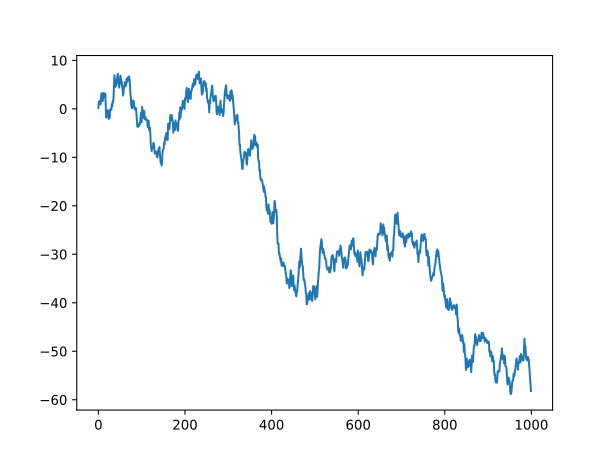
绘制 DataFrame
data = pd.DataFrame(np.random.randn(1000, 4),
                    index=np.arange(1000),
                    columns=list('ABCD'))
data = data.cumsum()
print(data.head())
data.plot()
plt.show()
A B C D
0 -0.502131 0.881413 1.863009 0.274485
1 -1.288362 -1.125122 2.148910 2.117900
2 1.488450 -0.997405 2.013918 2.099883
3 2.675366 -2.977633 3.416020 4.381450
4 2.784602 -0.788178 3.382317 5.305331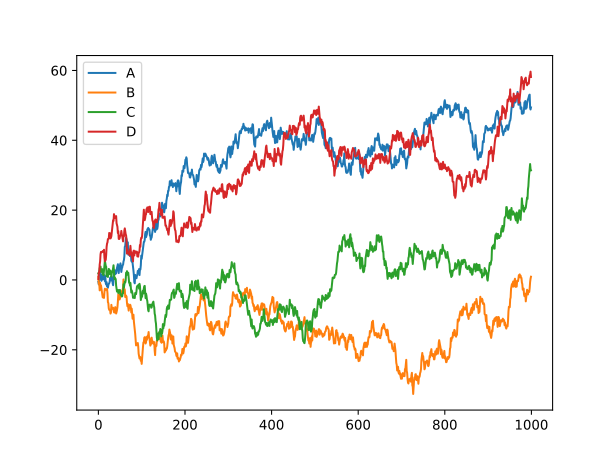
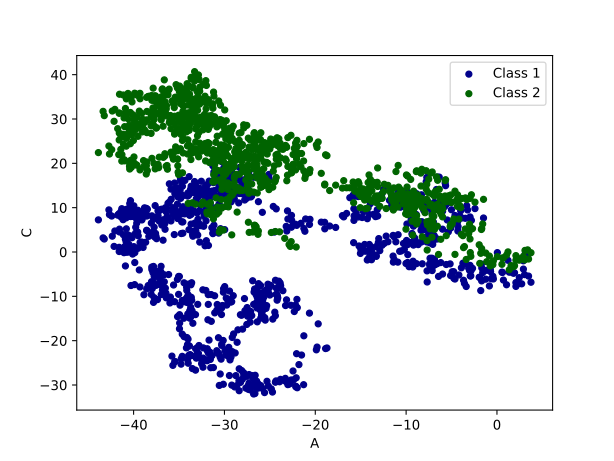
scatter
data = pd.DataFrame(np.random.randn(1000, 4),
                    index=np.arange(1000),
                    columns=list('ABCD'))
data = data.cumsum()
ax = data.plot.scatter(x='A', y='B', color='DarkBlue',
                    label='Class 1')
data.plot.scatter(x='A', y='C', color='DarkGreen',
                    label='Class 2', ax=ax)

plt.show()